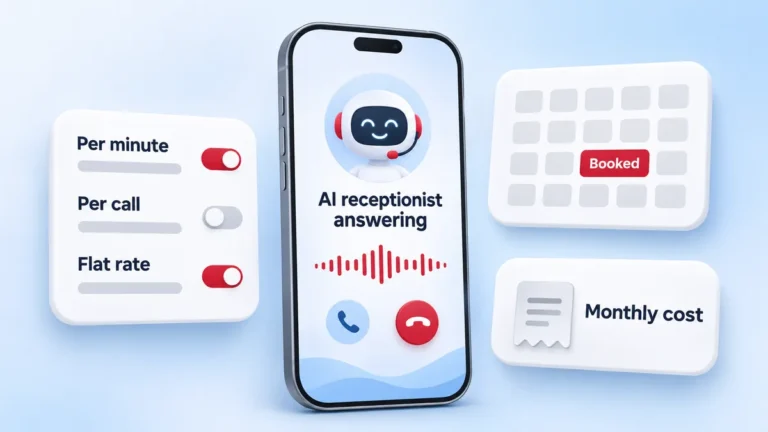
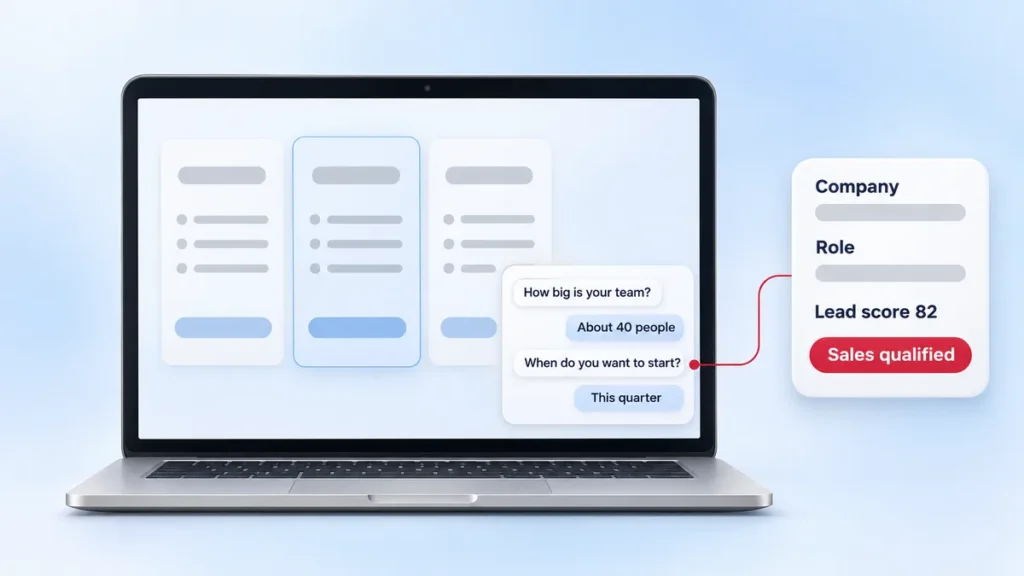
A B2B website chatbot can answer product questions, qualify visitors, book meetings and log chats in your CRM. Ask for a one-time quote for setup, integration and testing. Budget for the platform and usage each month.
NuroSparx custom chatbot builds start at $7,500. For your first-month budget, add any setup charges due that month to software and support. For later months, estimate seats, billed outcomes and maintenance at your own volumes.
What a B2B chatbot is, and how an AI website agent differs
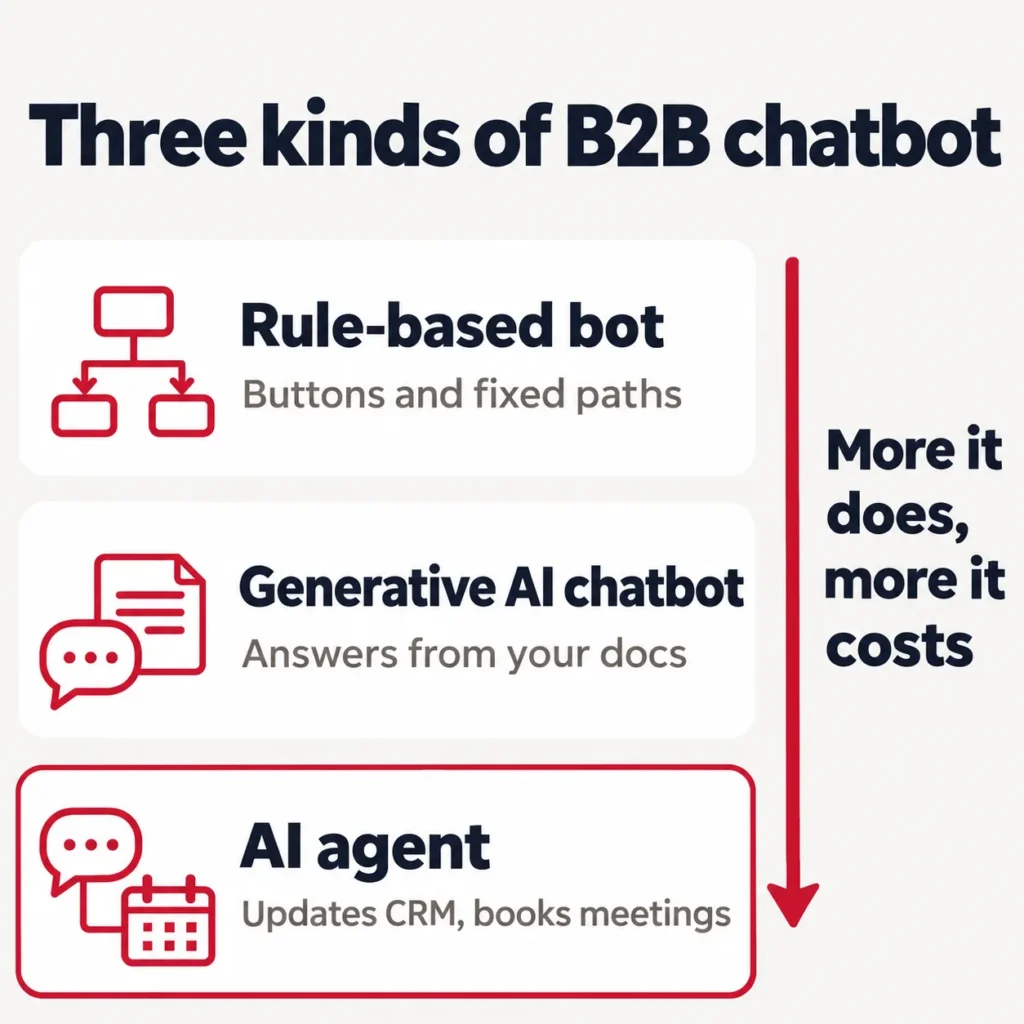
Vendors use “AI chatbot” for three different products. Know which one you’re pricing before you compare quotes.
| Type | How it works | What it can do | Best for |
|---|---|---|---|
| Rule-based bot | Fixed decision tree with buttons | Routes clicks to set answers | Simple menus, very low volume |
| Generative AI chatbot | A language model answers from your docs and site | Answers free-text questions in plain English | FAQ and pre-sales questions |
| AI agent | A language model plus actions in your systems | Looks up and updates CRM records, books meetings, hands off with context | Lead qualification and support that touches real data |
Most tools vendors sell to B2B teams today sit in the second or third row. Agents in the third row do the revenue work. An agent can check whether a visitor’s company already exists in HubSpot or Salesforce, score the lead, and drop a meeting on the right rep’s calendar.
A B2B chatbot also has a harder job than a B2C one. A retail bot mostly answers “where’s my order.” A B2B bot talks to someone who may not sign the deal, about a purchase that may take months. It has to capture company, role and timeline, answer technical questions about integrations and security, and leave a clean record a rep can act on the same day.
What B2B companies pay for AI chatbots in 2026
What B2B companies pay for AI chatbots and AI implementation comes down to three parts: the platform, the usage, and the work to connect it.
The market grew fast. Menlo Ventures puts US enterprise spending on generative AI at $37 billion in 2025, up from $11.5 billion in 2024. The same report found companies bought 76% of their AI use cases from vendors in 2025 and built the rest in-house. For a chatbot, that usually means you buy a platform and pay for the work to connect it.
Vendor pricing for B2B chatbots and AI agents
We checked each price on the vendor’s own pricing page or help docs on November 5, 2026. Vendors change these often, so confirm before you sign.
| Platform | Seat or plan price | AI agent usage price | Notes for B2B teams |
|---|---|---|---|
| Intercom (Fin AI Agent) | Essential $29, Advanced $85, Expert $132 per seat a month | $0.99 per outcome; $9.99 per qualified lead | You pay at most one outcome per conversation. Fin also runs on other help desks with no seat fee and a monthly minimum (Intercom’s example is 50 outcomes). |
| HubSpot (Customer Agent) | Service Hub Professional about $90 to $100 per seat a month, plus a $1,500 one-time onboarding fee | 50 HubSpot Credits per resolved conversation, which works out to $0.50 | Credits cost $0.01 each. Professional includes 3,000 credits a month; unused credits don’t roll over. |
| Zendesk (AI agents) | Suite Team $55, Suite Professional $115 per agent a month, billed yearly | $2.00 per automated resolution, pay as you go | Suite Team includes 5 automated resolutions per agent a month; Professional includes 10. |
| Salesforce (Agentforce) | Agentforce add-ons from $125 per user a month | $2 per conversation, or Flex Credits at $0.10 per action | Fits teams already on Salesforce CRM. |
| Tidio (Lyro AI Agent, November 5 snapshot) | Starter from $24.17, Growth from $49.17 a month | Lyro from $32.50 a month for 50 AI conversations | Fits smaller B2B sites with lighter volume. |
| Qualified (Piper AI SDR) | No public price; all plans go through sales | Not published | Plans scale by monthly web sessions, from 250,000 on Premier. Aimed at pipeline teams that run on Salesforce. |
Sources: Intercom’s Fin pricing docs, Zendesk pricing, HubSpot Credits and Salesforce Agentforce pricing. Tidio’s current plans count conversations handled by Lyro and your team toward one monthly limit when you choose an AI plan. Qualified’s plan comparison lists monthly session limits and directs buyers to sales for a quote.
On March 5, 2026, Clari + Salesloft announced a gradual Drift sunset and an exclusive agreement to refer existing Drift customers to 1mind. Any 2024 guide that tells you to buy Drift now points you at a product on its way out.
HubSpot also cut its price in 2026. On April 14, Customer Agent moved from $1.00 per conversation to $0.50 per resolved conversation, so you now pay only when the agent finishes the job.
What 1,000 AI conversations a month costs
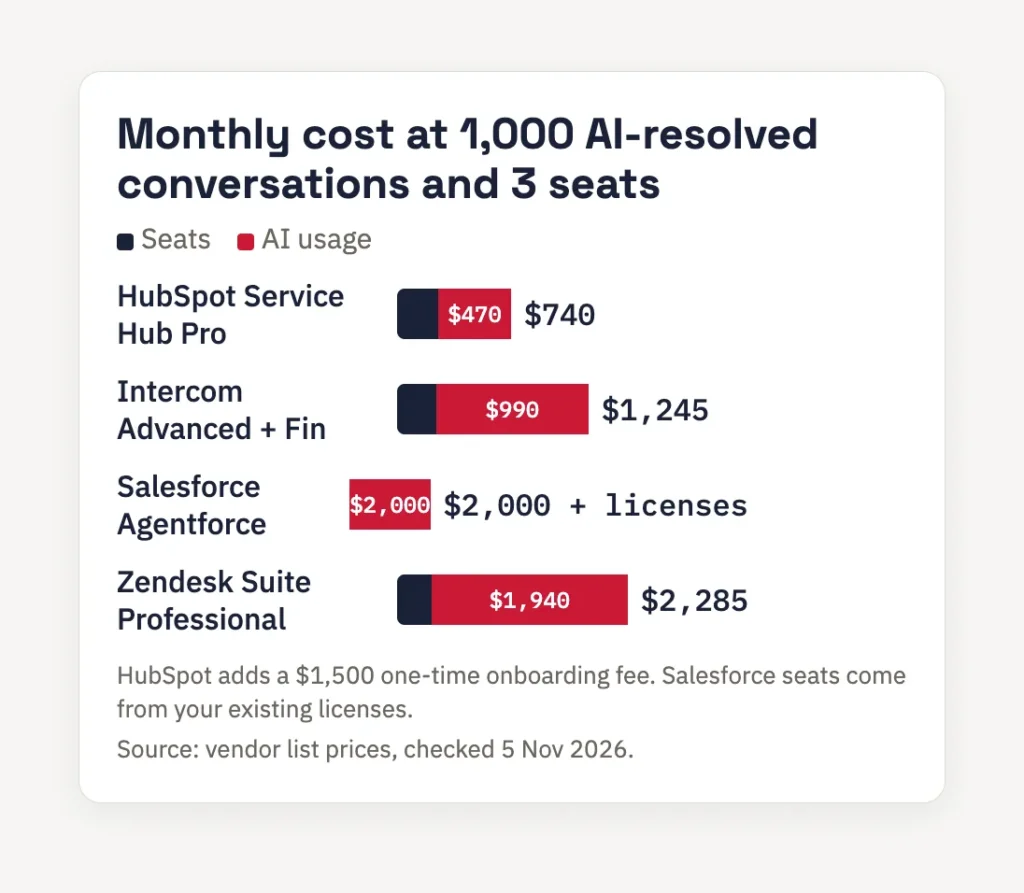
Seat prices look small next to usage. Here’s a team with 3 human seats and 1,000 conversations a month that the AI agent resolves on its own, priced at the list prices above.
| Platform | Seats | AI usage | Monthly total |
|---|---|---|---|
| HubSpot Service Hub Pro + Customer Agent | 3 x $90 = $270 | 47,000 extra credits x $0.01 = $470 | about $740, plus $1,500 one time |
| Intercom Advanced + Fin | 3 x $85 = $255 | 1,000 x $0.99 = $990 | about $1,245 |
| Salesforce Agentforce | Your existing Salesforce licenses | 1,000 x $2 = $2,000 | about $2,000 plus licenses |
| Zendesk Suite Professional + AI agents | 3 x $115 = $345 | 970 x $2.00 = $1,940 (30 included) | about $2,285 |
Intercom charges for one Fin outcome per conversation. It bills $0.99 for a resolution, a configured procedure handoff or a self-serve routing outcome. A sales qualification costs $9.99. If 150 of those 1,000 conversations qualify and the other 850 cost $0.99 each, usage totals $2,340. That adds $1,350 to the usage example above, before seat fees.
What setup costs beyond the license
The license is the easy line to budget. The rest of an AI chatbot implementation is labor, and that’s where most budgets slip. We scope seven cost drivers on every project.
- Knowledge base cleanup. The bot answers from your docs. If pricing pages, product sheets and security answers conflict, the bot repeats the conflict. Plan time to fix the source before launch.
- CRM integration. Native connectors push a name and email. A useful sync creates or updates the contact, company and deal, attaches the transcript, sets lifecycle stage and triggers routing. Custom field mapping takes the most hours.
- Qualification logic. Someone has to write the questions, the scoring and the handoff rules with your sales team. Expect a workshop, then several rounds of edits.
- Vendor onboarding fees. HubSpot charges $1,500 one time for Service Hub Professional and $3,500 for Enterprise. Ask every vendor about this before you compare quotes.
- Testing. Internal staff try to break the bot with off-script questions before any buyer sees it.
- Ongoing upkeep. Your prices, product and team change. Budget a few hours a month to read transcripts, fix wrong answers and update routing.
- Compliance work. Consent capture for forms and texts, and a privacy notice where the chat collects personal data.
Our breakdown of AI answering service costs uses the same method for per-minute and per-call pricing on the phone side.
When should a B2B company install an AI agent on its website?
Install one when your website already brings buyers you can’t answer fast enough. You’ll usually see one or more of these signs.
- Prospects land on pricing or demo pages outside office hours, and your team doesn’t reply until the next business day.
- Sales reps spend hours on first calls with leads who don’t fit your ideal customer profile.
- Your team answers the same 20 pre-sales questions every week: integrations, security, pricing tiers, setup time.
- Your demo form gets traffic but a low completion rate.
- Your CRM is clean enough that a new record will land in the right place.
Hold off if your CRM data is a mess or your site gets only a handful of qualified visits a month. In that case, fix lead tracking first. Our 90-day lead tracking cleanup walks through the order we use.
Our ChatGPT buyer test log shows examples of supplier questions and the answers they produce. The visitors who do reach your site arrive with sharper questions. A chatbot that answers them on the spot keeps them from going back to the assistant for a competitor.
How to implement a B2B chatbot in 6 steps
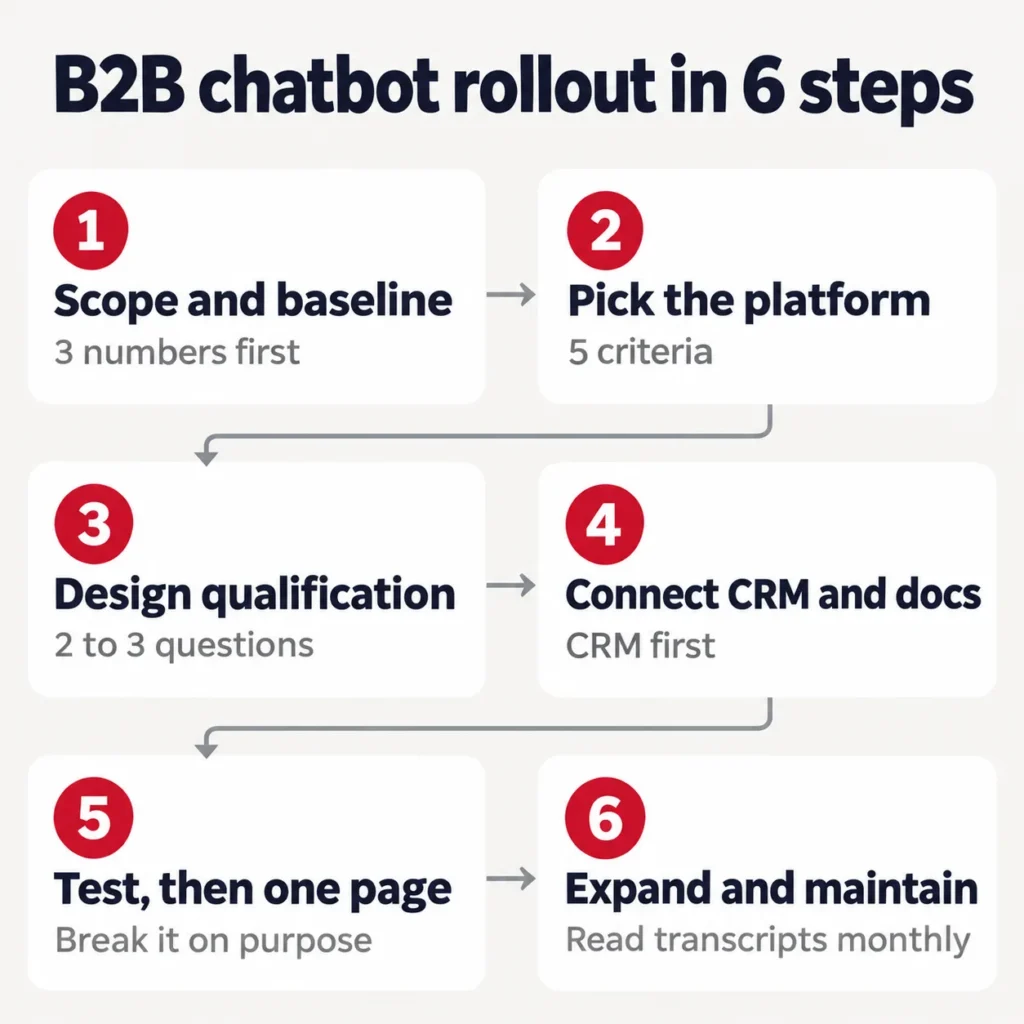
Step 1: Set the scope and a baseline
Write down three numbers before you touch a platform: your average response time to an inbound inquiry, your lead-to-meeting rate, and your cost per qualified lead. Without them, you can’t prove the bot did anything 90 days later.
Then pick one narrow job. “Qualify demo requests on the pricing page” is a scope. “Handle all customer conversations” is too broad, and broad scopes like that stall chatbot projects.
Step 2: Choose the platform with five questions
- CRM sync depth. Does it write the full transcript, company and lifecycle stage back to the CRM, or only a name and email?
- Who owns the conversation. Can your team edit the questions and answers directly, or does each change need a vendor ticket?
- Handoff control. Can you set exactly when the bot passes a chat to a person, by intent, confidence or request?
- Pricing model fit. Per seat, per resolution and per conversation reward different volumes. Run the 1,000-conversation math above with your own numbers.
- Data handling. Where does the vendor store chat data, and does it train models on it?
Our rule of thumb: start with the platform that matches the CRM you already run. HubSpot teams start with Customer Agent, Salesforce teams with Agentforce, and teams on a separate help desk look at Intercom Fin or Zendesk.
Step 3: Design the qualification flow
Start on your highest-intent page, usually pricing or demo. Write the qualifying questions in plain words.
- “How big is the team that would use this?” (fit and budget signal)
- “Are you making this call, or bringing others in?” (authority)
- “What’s pushing you to look at this now?” (need)
- “When do you want something live?” (timeline)
Open with two or three questions, then ask more once the chat earns trust. Six questions up front reads like a form in a chat bubble, and visitors leave.
Step 4: Connect the CRM and knowledge base
Connect them in this order.
- CRM first. Identity and account history drive everything else.
- Knowledge base second. Point the bot at your current docs, pricing and security pages so it answers from your facts.
- Routing last. Decide which outcomes send an instant Slack alert to a rep, which book a meeting, and which go to nurture email.
Test each connection on its own before you run the full flow. A broken sync that your team misses for two weeks costs more than having no bot, because leads look captured while they disappear.
Step 5: Test inside, then go live on one page
Test odd questions and requests that try to override the bot’s instructions. Run a returning prospect through the bot twice. Check that the CRM updates the same contact both times. Ask a question the bot can’t answer. Check that the right inbox gets the transcript. Then book a test meeting as a qualified prospect and check that the calendar and CRM show the same sales rep. Launch on one page after the checks pass. Read every transcript for the first two weeks and track resolution rate, handoff rate and meetings booked.
Step 6: Expand and maintain
Once the first flow works, add the next job, such as technical pre-sales questions or after-hours support. Keep the monthly review on the calendar. A bot that no one updates starts giving confident wrong answers within months.
How to connect your chatbot to the CRM
Sales reps stop trusting a chatbot within weeks if it creates a second, competing record. A good sync does four things.
- Creates or updates the contact, company and deal records on its own.
- Attaches the full transcript to the contact timeline, along with a summary.
- Maps the lead score to a lifecycle stage, so routing rules can act on it.
- Triggers same-day follow-up for qualified leads.
Most sync failures come from field mapping that someone set at launch and never revisited as the CRM changed. If your HubSpot or Salesforce setup has grown messy, our CRM consulting services team cleans up the schema before the bot writes to it.
When to use a chatbot platform or build a CRM integration
Say a software company wants its pricing-page chat to answer plan questions and book demos. Start with a chatbot platform if its CRM connector can find a contact by email, log the chat and send the demo request to the right sales queue. Run those checks in a test CRM before you buy.
Now send a test request from someone at an existing account. Suppose the connector creates a second contact or routes the request to the general queue. If configuration cannot fix either result, keep the chat platform and build a custom CRM connection. Look up the contact and account, update the matching record and send the request to the current account owner. Send requests with no clear match to a person for review.
Run three tests before launch. A new buyer creates one record, a returning buyer updates the existing record, and a failed CRM write creates a task for someone to follow up. Replay one submission to check that a retry creates no duplicate. If the platform passes those checks with its own connector, keep it.
Request a free chatbot scoping call. Bring one chat transcript and the CRM fields and routing rules it needs to use.
Privacy and texting rules for US B2B chatbots
Many chatbot guides lead with GDPR. For a US B2B company, two rules come up more often.
The California Consumer Privacy Act applies if your chatbot collects personal information from California residents and your business meets the law’s revenue or data thresholds. You need a notice at the point of collection and a working way to handle access, deletion and opt-out requests. The California Attorney General’s CCPA page lists the current rules.
The Telephone Consumer Protection Act applies the moment your flow sends a text, as many demo-booking flows do. Get clear consent in the chat before any automated SMS goes out. Build that consent step into the flow on day one, so you don’t have to retrofit it later.
Mistakes that sink B2B chatbot projects
- Launching everywhere on day one. Start with one page and one flow, then expand.
- No way to reach a person. A high-value buyer stuck with a bot leaves for a competitor’s form.
- Too many opening questions. Two or three start a conversation. Six end it.
- Treating launch as the finish line. Stale answers about pricing or features cost trust fast.
- Skipping the sync test. Submit a test lead yourself and check every field in the CRM before launch.
- Ignoring usage pricing. Model resolutions and qualifications at your real volume before you sign a yearly contract.
Start with one page and the cost math
Pick one high-intent page, write down your three baseline numbers and run the cost math above with your own volume. That takes an afternoon and tells you which platform fits.
If you’d rather have a team scope, build and maintain it, our AI chatbot development services start with one focused workflow, connect it to your CRM and calendar, and review transcripts each month. For wider work across reporting and workflows, see our AI automation and analytics service.
You're All Set!
We have your request.
Expect a reply from our team within 24 hours. Want to talk sooner? Pick a time below.
Or call us at +1 (914) 297-6638
Frequently asked questions
What are B2B companies paying for AI chatbots and AI implementation in 2026?
Most pay a seat fee plus a usage fee. On list prices checked in November 2026, AI-resolved conversations cost $0.50 on HubSpot, $0.99 on Intercom Fin and $2.00 on Zendesk or Salesforce Agentforce. At 1,000 resolved conversations and 3 seats, that's roughly $740 to $2,285 a month, before one-time onboarding fees and the labor to connect your CRM and knowledge base.
What is a B2B chatbot?
A B2B chatbot is software on your website that talks with business buyers in real time. Modern ones run on large language models and answer from your own docs. The best ones work as AI agents: they qualify the visitor, look up and update CRM records, book meetings with the right rep and pass the chat to a person when needed, with the full transcript attached.
When should a B2B company install an AI agent on its website?
Install one when buyers reach your pricing or demo pages and wait hours for an answer, when reps spend first calls on poor-fit leads, or when your team answers the same pre-sales questions every week. Wait if your CRM data is messy or your site gets only a few qualified visits a month. In that case, fix lead tracking first.
How long does it take to implement an AI chatbot for a B2B company?
A focused first workflow on one page can go live in about two weeks when the CRM is clean and the docs are current. A wider rollout with custom CRM field mapping, several qualification paths and a help desk connection takes longer. Most of that extra time goes into qualification logic and testing. The platform setup itself takes much less.
Is Drift still a good choice for B2B chatbots?
No. Clari + Salesloft is sunsetting Drift and has named 1mind as its exclusive successor. If you run Drift today, plan a move now. Most B2B teams pick the agent built into the CRM they already use: HubSpot Customer Agent or Salesforce Agentforce. Teams that want a separate tool look at Intercom Fin, Zendesk or Qualified.
Does a B2B chatbot need to sync with a CRM?
Yes. Without a live sync, the bot creates a second set of lead records that sales stops trusting within weeks. Every qualified chat should create or update the contact, company and deal, attach the transcript, set the lifecycle stage and trigger follow-up. Test the sync with a real lead before launch, and recheck field mapping whenever the CRM changes.
Sources
- https://menlovc.com/perspective/2025-the-state-of-generative-ai-in-the-enterprise/
- https://oag.ca.gov/privacy/ccpa
- https://www.hubspot.com/products/artificial-intelligence/credits
- https://www.intercom.com/help/en/articles/8205718-fin-ai-agent-resolutions
- https://www.salesforce.com/agentforce/pricing/
- https://www.zendesk.com/pricing/