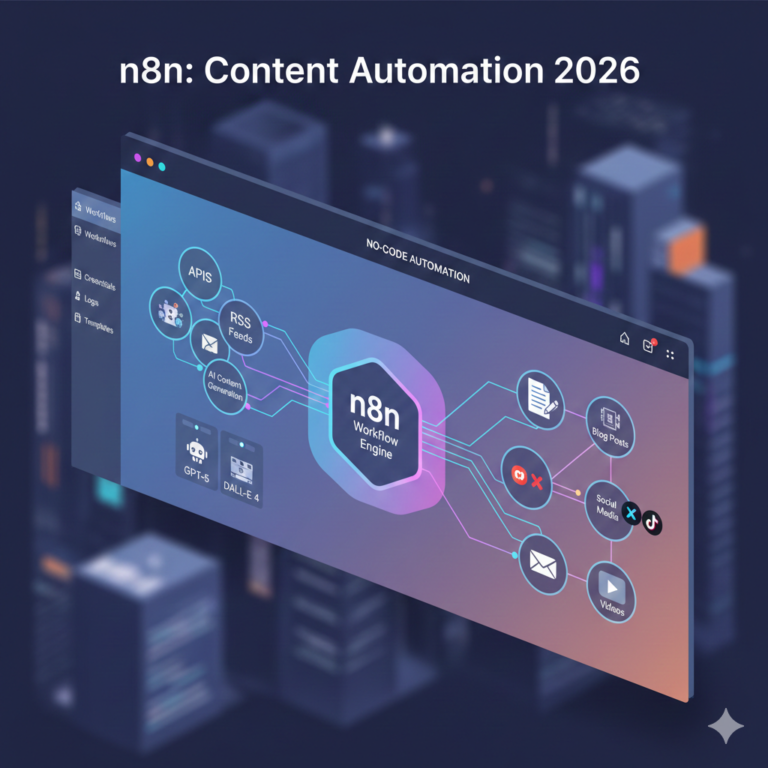

Your account manager just spent forty minutes copying Google Ads numbers into a client report. Again. Multiply that across twelve clients and four platforms each, and you’re looking at a full workday every week that never touches strategy. That’s the exact gap n8n was built to close, and this guide walks through setting it up for real, not just what it is.
What n8n Actually Is (And Why Agencies Are Switching)
n8n is an open-source workflow automation platform. You connect a trigger (a form submission, a scheduled time, a new CRM record) to a chain of actions, and it runs without a human touching it. If that sounds like Zapier or Make, it is, with three real differences.
First, pricing. n8n charges per workflow execution, meaning one complete run of your entire workflow counts as one unit, no matter how many steps are inside it. A ten-step client reporting workflow that runs once a day burns exactly one execution per run. On Zapier, that same workflow burns one task per step, so ten steps means ten tasks every single day. Run that math across twenty clients and the gap gets large fast.
Second, control. n8n supports raw JavaScript and Python inside individual nodes, plus native LangChain integration for wiring in OpenAI or Anthropic models directly into a workflow. You can also self-host it on your own server, which matters if a client ever asks where their CRM data physically lives.
Third, the learning curve is steeper. There’s no getting around this. Expect real setup time, not a five-minute demo. We’ll get into exactly how much below.
If you’re weighing this against Make.com specifically for content and creative workflows, our breakdown of building AI content pipelines with Make.com covers where that platform still wins on simplicity.
n8n vs Zapier vs Make: The Agency Math
Here’s the comparison that actually matters once you’re running automation for more than two or three clients.
| Factor | n8n | Zapier | Make |
|---|---|---|---|
| Billing unit | Per workflow execution | Per task (per step) | Per operation |
| Cost at 10,000 monthly runs | $50 to $60/mo (Pro plan) | $99 to $249+/mo | Scales fast with steps |
| Custom code in workflows | Yes (JS and Python) | Limited | Limited |
| Self-hosting option | Yes, free Community Edition | No | No |
| AI model integration | Native LangChain nodes | Native app but fewer branching options | Native app, fewer conditional patterns |
| Learning curve | Steep, 15 to 20 hours to first build | 2 to 3 hours to first zap | 5 to 8 hours to first scenario |
The honest takeaway: if you need one simple automation working by Friday and nobody on the team wants to touch expressions or JSON, Zapier gets you there faster. If you’re building automation as agency infrastructure that has to survive twenty clients and a hundred workflows, n8n’s execution-based pricing and self-hosting option pay for the learning curve within a couple of months.
Step-by-Step: Building Your First Agency Workflow
Skip the theory. Here’s the actual path from zero to a working automation, broken into weeks so you know what’s realistic.
Week 1: Setup and Your First Simple Automation
Pick n8n Cloud to start, even if you plan to self-host eventually. Fighting Docker and server config in the same week you’re learning nodes and expressions is how people quit by day three.
- Create an n8n Cloud account and open a blank workflow canvas.
- Add a trigger node. Start absurdly simple: a schedule trigger that fires once a day, or a webhook trigger tied to a Google Form.
- Add one action node. Send a Slack message or write a row to Google Sheets. That’s it for week one.
- Test it manually 15 to 20 times. Click “Execute Workflow” repeatedly until you understand exactly what data moves between nodes and why. This step feels tedious. It’s the single most useful hour you’ll spend learning the tool.
- Learn the expression editor. Click the formula icon next to any field instead of typing {{$json.fieldName}} from memory. One mistyped character breaks the whole chain, and the editor shows you the exact field names available.
Realistically, budget 15 to 20 hours for week one if you’ve never used a node-based automation tool. That number holds up whether you’re coming from a marketing background or an ops background.
Week 2 to 3: Build Something Real
- Import a community workflow template close to what you actually need (n8n’s template library has thousands, covering lead intake, reporting, and social publishing patterns).
- Swap in your own credentials and field mappings. Break it on purpose. Fix it. This is where the tool actually clicks.
- Add an IF or Switch node to handle branching logic, like routing a lead differently based on company size or budget.
- Build one workflow from scratch that solves a real problem for one client account. Start with something narrow: a single report, a single lead source, one platform.
Week 4 and Beyond: Make It Production-Grade
- Add an Error Trigger workflow. This is the step most beginners skip and immediately regret. Without it, a workflow can fail silently for days before anyone notices a client’s leads stopped routing.
- Add Wait nodes between API calls that run in a loop. Manual testing sends one request at a time; scheduled runs can fire fifty in a row and hit a rate limit you never saw coming.
- Export your workflow as JSON and store it somewhere outside n8n. Treat it like source code, because it is.
- Document what the workflow does and why, in plain language, in a shared doc. You will forget the logic in three months. So will whoever inherits it.
For a deeper technical walkthrough of building multi-step agentic automations once you’re past the basics, our advanced n8n automation guide picks up where this leaves off, and our n8n for beginners piece is a good companion if a junior team member needs the slower version of this same path.
Five Workflows Agencies Should Build First
Not every automation is worth your time. These five consistently deliver the fastest payback for agencies specifically.
- Automated client reporting. Scheduled trigger pulls data from Google Ads, Meta Ads, and GA4 through HTTP request nodes, a Code node normalizes the metrics into one format, and the result writes to Google Sheets or generates a PDF that emails itself to the client every Monday morning. Agencies running this across 15-plus accounts routinely report reclaiming 8 to 14 hours a week that used to go into copy-pasting numbers.
- Lead intake and CRM enrichment. A webhook catches a form submission, an enrichment API fills in company and title data, a Switch node scores the lead, and it lands in HubSpot or Salesforce with a Slack ping to the right account manager. Speed-to-lead is one of the clearest levers on conversion rate, and doing this by hand adds a delay that a same-day manual process just can’t beat.
- Campaign performance alerting. An hourly check against the Google Ads API compares spend and CPA against a threshold you set, and fires a Slack alert the moment something breaches it. This one doesn’t save hours directly. It saves the client relationship the morning a budget triples overnight and nobody caught it until the invoice.
- Content and SEO operations routing. A new keyword lands in a tracking sheet, n8n creates a content brief in ClickUp or Notion, assigns it to a writer, sets a due date, and schedules the piece for publishing once it’s marked complete. One human touchpoint instead of five.
- AI-assisted client updates. A LangChain node summarizes the week’s performance data into a plain-language email draft using Claude or GPT, which an account manager reviews and sends. This isn’t about replacing the account manager. It’s about killing the hour they spend translating a spreadsheet into sentences every single Friday.
If outbound prospecting is part of your stack too, the same node logic applies to sequencing and personalization. Our guide on scaling AI outreach without tripping spam filters walks through the guardrails that matter there specifically.
Structuring n8n for a Multi-Client Agency (Without It Breaking)
The single most common mistake agencies make is building one giant workflow that tries to handle every client’s version of the same process. It works fine for month one. By month four, one client’s API change breaks reporting for eleven others, and nobody can figure out why.
Build it modular instead:
- Reusable sub-workflows. Build a “pull GA4 data” workflow once and call it from every client’s reporting flow using the Execute Workflow node. Fix the logic once when an API changes, not eleven times.
- A config sheet, not hardcoded values. Store client IDs, API keys, and thresholds in Airtable or Google Sheets. Adding a client means adding a row, not duplicating a workflow and hoping you remember to change every field.
- Folders per client or function. “Client A, Reporting,” “Client A, Lead Routing,” “Shared, Enrichment.” Boring, but it’s the difference between finding a broken workflow in ten seconds versus twenty minutes.
- Error handling on every workflow that touches a client deliverable. Not optional past client number three.
Cloud vs Self-Hosted: The Compliance Question US Agencies Skip
Most guides treat this as a cost question. For a US agency, it’s often a client-data question first.
If you handle CRM records, personal information, or anything touching healthcare or financial clients, self-hosting on your own server (Hetzner, DigitalOcean, AWS) means the data never leaves infrastructure you control. That matters more every year as state-level privacy laws expand beyond California. n8n Cloud is the easier path if nobody on your team wants to own server maintenance, patching, and 2 a.m. downtime calls, and your client contracts don’t specify data residency requirements.
A middle ground several agencies land on: n8n Cloud for internal ops (content briefs, internal reporting) and a self-hosted instance specifically for anything touching client CRM or personal data.
Costs and Timelines: What to Actually Expect
Based on n8n’s official pricing, here’s the current breakdown.
- Community Edition (self-hosted): Free software, unlimited executions. You pay only for server hosting, typically $5 to $20 a month on a small VPS.
- Cloud Starter: Roughly $20 to $24/month for 2,500 executions, 5 concurrent runs, unlimited users and workflows.
- Cloud Pro: Roughly $50 to $60/month for 10,000 executions, 20 concurrent runs, plus workflow history and admin roles.
- Business (self-hosted, paid): Several hundred dollars a month, built for organizations under 100 employees needing SSO and governance features.
One workflow polling an inbox every five minutes alone can burn through 8,000-plus executions a month, so map your expected volume before picking a tier. A single-purpose workflow like weekly reporting typically takes 4 to 12 hours to build, test, and deploy properly. Multi-step workflows with AI nodes and conditional branching run 20 to 40 hours. If you’re weighing whether this is worth building in-house versus handing to a specialist team, it’s worth reading through the real numbers in our in-house team vs agency cost comparison before committing internal hours to the learning curve.
Mistakes That Kill Agency Automation Projects
Building the perfect workflow before shipping anything. Ship the ugly version that works for one client first. Refine it once it’s actually running.
Skipping error notifications. A workflow that fails silently for three days and quietly drops leads is worse than no automation at all, because everyone assumes it’s working.
No documentation. You will not remember why that Switch node has four branches in six months.
Trying to build for every client at once. Agencies that attempt a full-stack automation rollout in month one end up with a dozen half-finished workflows and quietly stop using the platform by week six.
Treating it as a one-time build. APIs change. HubSpot updates its endpoints. Google Ads deprecates a field. Budget maintenance time into the retainer, not just the build.
Automation infrastructure like this is exactly what powered the pipeline rebuild behind our IntegrateIQ case study, where connecting the sales and marketing stack end to end doubled the client’s pipeline without adding headcount. If you’d rather have a team that’s already made these mistakes build it for you, our AI automation services team handles the architecture, the error handling, and the maintenance so you’re not the one debugging a broken Slack alert at 11pm.
For agencies going further into agent-based automation, pairing n8n with a broader no-code AI automation stack or exploring Claude’s agent skills and MCP opens up more complex, multi-tool workflows once the basics are solid.
FAQs
Is n8n better than Zapier for marketing agencies?
For agencies running automation across multiple clients, n8n is usually cheaper and more flexible because it bills per workflow execution instead of per task, and it supports custom code and conditional logic that Zapier limits. Zapier is still faster to set up if you need one simple automation working today and do not want to manage nodes, expressions, or self-hosting.
How much does n8n cost for an agency?
n8n Cloud starts at 20 to 24 dollars a month for the Starter plan with 2,500 executions, and Pro runs 50 to 60 dollars a month for 10,000 executions. Self-hosting the Community Edition is free software with unlimited executions, so most agencies only pay for a small VPS, typically 5 to 20 dollars a month, once they are running automation for several clients.
How long does it take to learn n8n?
Expect 15 to 20 hours to build a working first workflow if you have never used a node-based automation tool before. Agencies that already run Zapier or Make automations tend to move faster because the trigger and action concepts carry over, even though n8n’s interface and expression syntax take longer to get comfortable with.
Should agencies self-host n8n or use n8n Cloud?
Agencies handling sensitive client data, such as CRM records or personal information under state privacy laws, often self-host so data never leaves their own server. Agencies without a technical resource to manage server updates and backups are usually better off on n8n Cloud, even at a higher monthly cost, because it removes the maintenance burden.
What is the first workflow an agency should automate with n8n?
Automated client reporting is the standard starting point. It pulls data from ad platforms and analytics tools on a schedule, formats it, and sends or uploads the report without anyone touching a spreadsheet. The inputs and outputs are well defined, which makes it easier to build correctly on the first attempt.
Can n8n connect to HubSpot, Google Ads, and Slack?
Yes. n8n has native nodes for HubSpot, Google Ads, Meta Ads, Slack, Google Sheets, and most of the standard agency stack. For any platform without a native node, the HTTP Request node can connect to it directly as long as the platform has a public API.
Pick one workflow from the list above, block off the fifteen hours, and build it this week. Everything after your first working automation gets faster from