Create Your Own AI UGC Influencer That Looks Real for Under $10
You're scrolling through Instagram, watching product reviews. Half of them? AI avatars. Five years ago, that sentence would sound like science fiction. Now it's Tuesday.
Want results like this for your business?
NuroSparX builds AI-powered growth engines for SMBs doing $5M-$100M. Let’s talk.
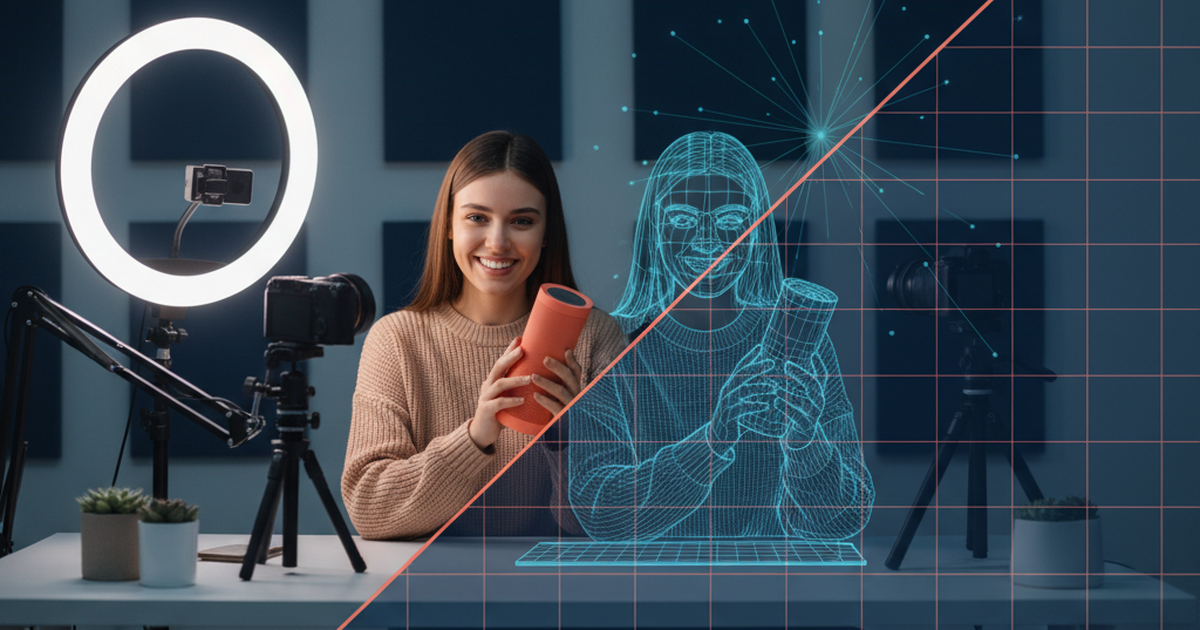
Here's the brutal truth about traditional UGC: a human creator charges $200–500 per video, takes 2 weeks to deliver, and you're locked into one person's style. Meanwhile, AI UGC tools have gotten so good at facial expressions, tone, and natural hesitations that most viewers can't tell the difference. And they cost 96% less.
If you're running an ecommerce brand, DTC startup, or solo operation, you've probably thought about using user-generated content (UGC) for your ads. You've also probably seen that price tag and noped out. But what if you could spin up a photorealistic AI influencer—one that looks human, speaks naturally, and hits your exact brand voice—for under $10? Not per campaign. Per month.
This isn't hype. It's happening right now, and the tools to do it are free or dirt cheap.
Let me walk you through how to build your own AI UGC creator, which tools actually deliver realistic results, and exactly how much you'll save.
Why AI UGC Just Crossed the "Looks Real" Threshold in 2026
For years, AI avatars looked like Zoom calls from 2015. Robotic mouths. Dead eyes. Zero personality. Brands knew better than to use them in real ads.
That all changed in the last 12 months.
The breakthrough wasn't some secret from OpenAI. It was a combination of three things: better lip-sync algorithms, behavioral mimicry (avatars now pause, hesitate, use hand gestures), and contextual realism (the avatar reacts to what it's describing, not just words).
Here's what changed:
- Facial expressions are now frame-by-frame realistic. When your avatar laughs, their eyes actually crinkle. When they're serious, their eyebrows drop.
- Voice syncing is pixel-perfect. No more uncanny valley mouth movements.
- Natural speech patterns include pauses, "ums," and tone shifts that real humans use.
- Hand gestures and body language respond to the script content.
- Custom avatar cloning lets you upload 4–5 photos and create an AI version of yourself (or anyone).
The result? People watch these videos and assume they're watching a real person. Some even assume it's a human influencer they've never heard of.
This is why 2026 is different. The tech finally caught up to the marketing hype.
The 7 Best AI UGC Tools Under $20/Month (Ranked by Realism)

There are dozens of AI UGC tools out there now. Most are garbage. A few are actually good. Here's the honest breakdown of the ones that deliver realistic results.
1. HeyGen ($0–19/mo)
Price: Free tier available; paid starts at $19/mo Realism Score: 9.2/10 Best For: Ecommerce brands, product reviews, testimonials
HeyGen is the gold standard right now. Their avatars look genuinely human. Facial expressions are smooth, voice syncing is flawless, and the library of pre-made avatars is huge. You can also upload your own photos to create a custom avatar (5 photos minimum, completely free).
The free tier gives you 1 minute of video per month, which sounds limiting until you realize most product review videos are 15–30 seconds. You can make several short ads from that.
The paid plan ($19/mo) gives you 10 minutes per month. For most SMBs, that's enough for 20–40 short-form ads.
Verdict: Best overall. Start here if you're new.
2. Bandy AI ($0)
Price: Completely free Realism Score: 8.8/10 Best For: Testing, bootstrapping, solo founders
Bandy AI is the free option that actually works. Their avatars are good-looking, the voice quality is solid, and there's zero artificial limit on video length (it's browser-dependent, but realistically you can generate 30–60 second videos daily).
The catch? You're limited to their pre-made avatars. You can't upload your own photo to create a custom clone. But if you're just testing whether AI UGC works for your business, this saves you $228/year.
The output quality is legitimate. These videos don't look cheap.
Verdict: Best budget option. No excuse not to try this.
3. Creatify ($0–19/mo)
Price: Free plan available; paid at $19/mo Realism Score: 8.5/10 Best For: TikTok, Instagram Reels, short-form content
Creatify specializes in quick product videos. Their interface is beginner-friendly: upload product image, paste script, select avatar, click generate. Done in 2–3 minutes.
The avatars are solid, though slightly less expressive than HeyGen's. But for short-form content (15–30 seconds), the difference is minimal. Most viewers won't notice.
Free plan includes 3 videos per month. Paid unlocks unlimited.
Verdict: Best for beginners. Fastest workflow.
4. MakeUGC ($0–29/mo)
Price: Free plan; paid at $29/mo Realism Score: 8.3/10 Best For: Ecommerce ads, testimonials, product launches
MakeUGC is built specifically for UGC ads. It's not trying to be a general avatar platform. It's trying to replace human UGC creators.
The avatars are good, the scripts are easy to write, and the output is polished. The pricing is slightly higher than others, but the workflow is optimized for ad production.
Free tier: 1 video/month. Paid: unlimited with stock footage library included.
Verdict: Best specialized tool. Best for dedicated UGC campaigns.
5. GenApe ($0–15/mo)
Price: Free tier; paid at $15/mo Realism Score: 8.1/10 Best For: Volume creators, agencies, brands running 10+ ads/month
GenApe is designed for agencies that need to pump out dozens of videos. The batch processing is lightning-fast, and the pricing is the lowest of the paid tier.
Avatar quality is good but not quite HeyGen level. However, for $15/mo unlimited videos, it's absurd value.
Verdict: Best value for volume. Best for scaling.
6. The Influencer AI ($19/mo)
Price: $19/mo Realism Score: 7.9/10 Best For: Creators focused on Instagram Stories, YouTube Shorts
The Influencer AI focuses on short, personality-driven content. The avatars have more "character" than others, which is good for certain brand voices (playful, energetic, young) and less good if you're trying to look like a professional consultant.
Unlimited videos on paid plan.
Verdict: Best for personality-driven brands. Skip if you need "corporate professional" vibes.
7. FaceLess ($0–29/mo)
Price: Free with limited exports; paid at $29/mo Realism Score: 7.6/10 Best For: YouTube, long-form content, educational videos
FaceLess specializes in screen-based presentations with AI voiceover. Less avatar-focused, more presentation-focused. Great if you're doing tutorials or educational content, less ideal for product reviews.
The avatar quality is acceptable but the lowest on this list. However, if your use case is tutorials or educational content, the presentation angle might win out.
Verdict: Best for tutorials and educational content. Skip for product reviews.
Step-by-Step: Create Your First AI UGC Video in 10 Minutes
Let's get practical. Here's exactly how to make your first video, using HeyGen (which is the smoothest experience for beginners).
Step 1: Pick Your Tool (2 minutes)
Go to HeyGen.com or Bandy AI. HeyGen if you want premium quality and have $19/month. Bandy AI if you're testing.
Sign up. It takes 60 seconds.
Step 2: Write Your Script (3–5 minutes)
Your script should be 30–45 seconds long. Anything longer and you're wasting attention. Here's a template you can adapt:
—
TEMPLATE: Product Review UGC Script
[Open with energy/casual tone] "Hey! So I've been using [PRODUCT NAME] for about two weeks now, and I gotta say, I was skeptical at first. Here's why."
[Build tension or problem] "The thing about [PROBLEM] is that most solutions are either [Option A] or [Option B]. They don't actually solve [THE REAL ISSUE]."
[Introduce solution] "But [PRODUCT] actually does something different. Here's what I mean."
[Specific benefit] "In my [use case], this feature specifically [benefit] without [common complaint]. That's huge because [why it matters]."
[Social proof or secondary benefit] "And honestly? The [secondary feature] is the part I didn't expect to love."
[Call to action] "If you're dealing with [problem], this is worth trying. You can grab it [where to buy]. Link's in my bio."
—
Real example:
[Open] "Hey, so I've been using this electric toothbrush for three weeks, and I went from 'meh' to 'why didn't I buy this sooner.'"
[Problem] "Most electric toothbrushes either strip your gums or they're so gentle you're wondering if they actually work."
[Solution] "This one actually has adaptive pressure. It reads your gum sensitivity."
[Benefit] "So in the first week, my gum bleeding stopped. Normally that takes months."
[Secondary benefit] "Plus the battery lasts three weeks. I'm not charging this thing every night."
[CTA] "If you have sensitive gums, grab this. Link's below."
—
Keep it conversational. Use contractions. Sound like a real human, not a robot reading a teleprompter.
Step 3: Choose or Create Your Avatar (2 minutes)
HeyGen has 100+ pre-made avatars. Browse them. Pick one that matches your brand voice.
Want to look exactly like your brand founder? Upload 5–10 photos of yourself. HeyGen's system will clone your face onto an avatar. Free. Takes 5 minutes.
Pro tip: upload photos in different lighting and angles. Side profile, straight on, laughing, serious.
Step 4: Generate the Video (1 minute)
Paste your script. Select voice (HeyGen has 150+ language/accent options). Click generate.
Come back in 2–10 minutes. Your video is ready.
Step 5: Quick Edit and Publish (2–3 minutes)
Download the video. Open it in CapCut or even your phone's built-in editor. Add:
- Captions (auto-generated from the script, HeyGen does this)
- Your product image or B-roll (15 seconds in)
- Your logo at the end
- CTA text overlay
Export. Upload to TikTok, Instagram Reels, YouTube Shorts, or your ads platform.
Done. You just made a product review video in 10 minutes for $0 (if using free tier).
How to Clone Yourself as an AI Avatar (The $0 Approach)
Most people don't realize this: you can create a perfect AI clone of yourself for free.
HeyGen's avatar cloning feature costs zero dollars. You just upload photos.
Here's how:
1. Gather 5–10 photos of yourself Different angles. Different lighting. One laughing, one serious. Natural shots, not headshots.
2. Go to HeyGen > Custom Avatar > Upload Photos Takes 5 minutes to process.
3. Test it with a script Your cloned avatar is now ready to use in any HeyGen video.
That's it. Now every video you make has your face on it. Brand consistency. Trust. Personality.
This is why personal brands are going to dominate 2026. You can have your face on 50 videos without filming a single one.
The Psychology Angle
Here's what's interesting: when people see your AI clone in ads, they feel like they know you. The familiarity builds trust. You're no longer a faceless brand. You're a person.
Even though it's AI, the effect is the same as if you'd filmed all the videos yourself. Your audience doesn't care about the technology. They care about feeling connected to you.
So if you're a founder, coach, course creator, or consultant, cloning yourself as an AI avatar is a cheat code.
Real Numbers: AI UGC vs Human Creator Cost Breakdown
Let's talk money, because that's why you're here.

Monthly Comparison
*HeyGen paid tier ($19/mo ÷ 10 videos per month = $1.90/video). Free tier is technically $0/video.
Real-World Scenario: Running 20 Product Videos/Month
Human UGC:
- 20 videos × $300 average = $6,000/month
- 2–4 week turnaround per batch
- Coordinating schedules, revisions, communications
AI UGC (Creatify or HeyGen):
- $19–29/month
- All 20 videos created in 4–5 hours of your time
- Instant revisions and split testing
Monthly savings: $5,971–5,981 per brand
Yearly savings: $71,652–$95,772 per brand
That's not accounting for volume discounts you can now run. With AI UGC, you can afford to test 50 variations of a video in one week. With human UGC, one variation costs $300.
Why This Math Breaks the Old Model
For years, UGC was a luxury reserved for brands with $50K+ ad budgets. Now it's accessible to anyone with $19/month.
That's a 99% democratization of a content format that directly drives conversions.
3 Mistakes That Make AI UGC Look Fake (And How to Fix Them)
Despite how good these tools are, you can still accidentally make your videos look robotic. Here's what kills the illusion and how to avoid it.
Mistake #1: Scripts That Sound Like Wikipedia
The Problem: "The innovative features of this revolutionary product include enhanced user interface optimization and streamlined functionality architecture."
No human talks like this. Ever. Your avatar will sound like a robot reading a Wikipedia article.
The Fix: Write like you talk. Use short sentences. Use contractions. Use "uh" and "um" strategically. Real humans pause and backtrack occasionally.
Bad: "The multifunctional design aspect allows for versatile utilization." Good: "You can use it for basically anything. I've used it for [X], [Y], and even [Z]."
Mistake #2: No Body Language or Movement
The Problem: Your avatar stands perfectly still with zero hand gestures. It's like watching a mannequin. Creepy.
The Fix: Better tools like HeyGen let you add hand gestures to your script. Markup your script with actions:
"[Gesture at product] This is the part that really got me. [Pause, nod] You can see it here."
The avatar will move naturally. It won't feel robotic.
Mistake #3: Ignoring Pacing and Energy
The Problem: Your avatar talks in a monotone at the same speed the entire video. Boring. Doesn't feel human.
The Fix: Vary your vocal delivery. Speed up on exciting parts. Slow down when something is important. Add pauses.
Script markup example: "[Excited] I've been using this for three weeks and [pause] it actually changed how I work."
The voice engine will pick up on your intended pacing.
The Strategy: Building a Full UGC Pipeline on $50/Month
Now let's get strategic. How do you actually use AI UGC to grow a brand?
The 5-Week Launch Plan
Week 1: Test and Clone
- Sign up for HeyGen (free tier)
- Create 5 product review variations
- Clone yourself as an avatar
- Test on TikTok (organic, free)
- Cost: $0
Week 2–3: Measure What Works
- Look at which videos got engagement
- Note which avatars, scripts, and angles resonated
- Identify your winning format (testimonial vs demo vs unboxing)
- Cost: $0
Week 4: Scale Up
- Subscribe to HeyGen ($19/mo) or Creatify ($19/mo)
- Create 15–20 variations of your winning format
- Start running paid ads with the best performers
- Cost: $19
Week 5+: Systematic Production
- Create a content calendar: 4 videos per week
- Batch script writing (Wednesday)
- Batch video generation (Friday)
- Launch ads (Monday)
- Monitor performance
- Monthly cost: $19–29
The Monthly Workflow (After Launch)
Hour 1–2: Script Writing (Wednesday) Write 4 scripts: testimonial, demo, unboxing, comparison. Use the template from earlier.
Hour 3: Avatar Selection Pick your 4 best-performing avatars from previous testing. Or use your cloned avatar for consistency.
Hour 4–5: Video Generation Paste scripts, click generate. Wait 5–10 minutes. You now have 4 polished product review videos.
Hour 6: Quick Edits Add captions, your logo, B-roll. Upload to ads platform.
Week 2–4: Measure and Iterate Watch conversion rates. Which videos convert best? Double down on the format. Kill the underperformers.
This is a system you can run solo in 6 hours per month.
Compare that to managing a human UGC creator: scheduling calls, managing revisions, dealing with cancellations, rewrites, "the videos look nothing like we discussed."
Why This Scales
The magic of AI UGC is that you can test way more variations. With a human creator, testing 10 script variations costs $3,000. With AI, it costs 10 minutes of your time.
More testing = faster learning = faster growth.
And here's the part most people miss: you're building a library. Every video you create is an asset you own forever. You can repurpose it across platforms, update it, remix it, translate it.
A human UGC video? One platform, one campaign, then it's done.
FAQ
Q: Will my audience know it's AI? A: Probably not. Modern AI avatars are indistinguishable from real humans in most contexts. If you're concerned, you can disclose it (some brands actually position it as a feature—"made with AI, zero production time"). But the realism is genuinely there now.
Q: Can I use copyrighted music in AI UGC videos? A: Same rules as any video. Use royalty-free music (YouTube Audio Library, Epidemic Sound, Shutterstock Music) or licensed music. Most AI tools have music libraries built in.
Q: What happens if my audience finds out my product videos are AI? A: Honestly? Most don't care. Conversion is what matters. If your video converts, the format is invisible. If it doesn't convert, being human won't help. That said, authenticity matters in certain industries (wellness, coaching, personal brands). For those, consider disclosing or using your cloned avatar for added legitimacy.
Q: Can I use AI UGC for TikTok Shop or Instagram Shopping? A: Absolutely. Both platforms allow AI-generated content as long as it's not misleading (e.g., claiming a fake person is a real customer). Most successful TikTok Shop sellers are already using AI avatars.
Q: What if I want to change the script after generating the video? A: Regenerate it. Most tools let you edit the script and create a new version in 2–3 minutes. No render times, no waiting.
The Bottom Line
Five years ago, this technology didn't exist. Three years ago, it existed but looked terrible. Now, in 2026, you can create photorealistic product review videos for $19/month.
That's not a marginal improvement. That's a paradigm shift.
If you're still outsourcing UGC to human creators at $200–500/video, you're leaving money on the table. Switch to AI, reinvest the savings into testing and volume, and you'll grow faster.
The brands that move first win. The ones that wait are betting that their competitors won't figure this out.
They will.
—
Ready to launch AI UGC videos for your brand? Check out our UGC video strategy guide or reach out to the NuroSparx team for a custom growth plan. We help DTC brands scale from $25K to $100K+ monthly revenue. Schedule a consultation.
Want to combine AI UGC with paid ads? Our performance marketing guide covers the full funnel. Or explore how shorts and graphics complement your video strategy.