You’re scrolling Instagram, watching product reviews, and half of them use AI avatars. Five years ago, that sentence would have sounded like science fiction.
Want results like this for your business?
NuroSparx builds AI-powered growth engines for companies doing $1M to $100M. Let’s talk.
A human UGC creator charges $200 to $500 per video, takes 2 weeks to deliver, and locks you into one person’s style. AI UGC tools now handle facial expressions, tone and natural hesitations so well that most viewers can’t tell the difference. And they cost 96% less.
If you run an ecommerce brand, a DTC startup or a solo operation, you’ve probably thought about using user-generated content (UGC) in your ads. You’ve also probably seen the price tag and noped out. What if you could spin up a photorealistic AI influencer that looks human, speaks naturally and hits your brand voice for under $10 a month?
You can do it right now, and the tools are free or dirt cheap. Below, you’ll see which tools give realistic results, how to build your own AI UGC creator and how much you’ll save.
Why AI UGC crossed the “looks real” line in 2026
For years, AI avatars looked like Zoom calls from 2015: robotic mouths, dead eyes, zero personality. Brands knew better than to put them in real ads.
That changed in the last 12 months.
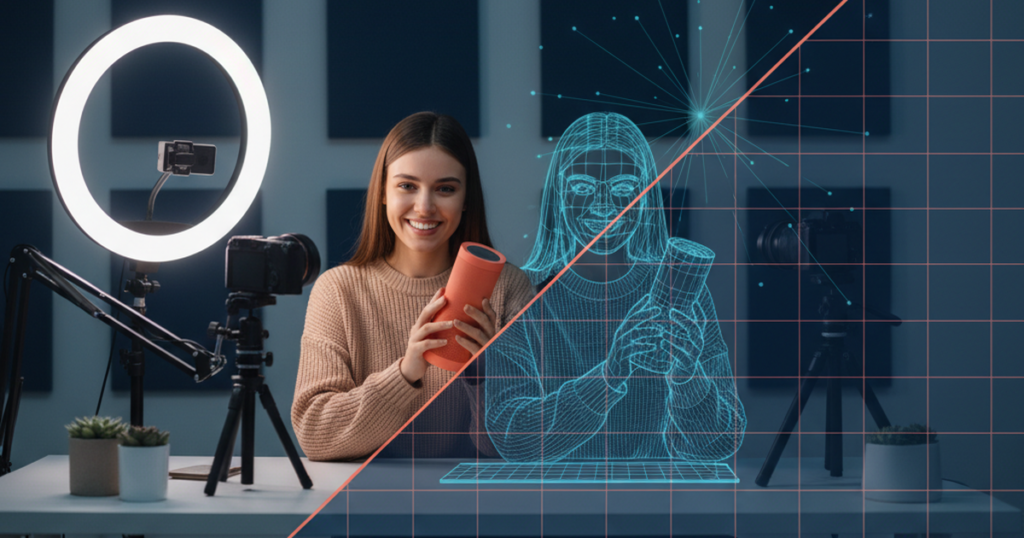
No secret from OpenAI did it. Three things came together: better lip-sync algorithms, behavioral mimicry (avatars now pause, hesitate and use hand gestures) and contextual realism (the avatar reacts to what it’s describing as well as to the words).
- Facial expressions now look real frame by frame. When your avatar laughs, their eyes crinkle. When they’re serious, their eyebrows drop.
- Voice syncing is pixel-perfect. The uncanny valley mouth movements are gone.
- Natural speech patterns include the pauses, “ums” and tone shifts real people use.
- Hand gestures and body language respond to the script.
- Custom avatar cloning lets you upload 4 to 5 photos and create an AI version of yourself (or anyone).
People watch these videos and assume a real person is talking. Some even assume it’s a human influencer they’ve never heard of.
In 2026, the tech finally caught up to the marketing hype.
The 7 best AI UGC tools under $20 a month, ranked by realism

There are dozens of AI UGC tools out there now. Most are garbage. These are the ones that give realistic results.
1. HeyGen ($0 to $19/mo)
Price: Free tier available; paid starts at $19/mo
Realism Score: 9.2/10
Best For: Ecommerce brands, product reviews, testimonials
HeyGen is the gold standard right now. Its avatars look human. Facial expressions are smooth, voice syncing is flawless, and the library of ready-made avatars is huge. You can also upload your own photos to create a custom avatar (5 photos minimum, completely free).
The free tier gives you 1 minute of video per month. That sounds tight until you remember most product review videos run 15 to 30 seconds, so you can make several short ads from it.
The paid plan ($19/mo) gives you 10 minutes per month. For most SMBs, that’s enough for 20 to 40 short-form ads.
Verdict: Best overall. Start here if you’re new.
2. Bandy AI ($0)
Price: Completely free
Realism Score: 8.8/10
Best For: Testing, bootstrapping, solo founders
Bandy AI is the free option that works. The avatars look good, the voice quality is solid, and there’s no set limit on video length (it depends on your browser, but you can realistically generate 30 to 60 second videos daily).
The catch: you’re limited to their ready-made avatars. You can’t upload your own photo to create a custom clone. If you only want to test whether AI UGC works for your business, this saves you $228/year.
The output quality holds up. These videos don’t look cheap.
Verdict: Best budget option. You have no reason to skip it.
3. Creatify ($0 to $19/mo)
Price: Free plan available; paid at $19/mo
Realism Score: 8.5/10
Best For: TikTok, Instagram Reels, short-form content
Creatify specializes in quick product videos. The interface is beginner-friendly: upload a product image, paste a script, pick an avatar, click generate. You’re done in 2 to 3 minutes.
The avatars are solid, though a little less expressive than HeyGen’s. For short-form content (15 to 30 seconds), the gap is small, and most viewers won’t notice.
The free plan includes 3 videos per month. The paid plan gives you unlimited videos.
Verdict: Best for beginners. Fastest workflow.
4. MakeUGC ($0 to $29/mo)
Price: Free plan; paid at $29/mo
Realism Score: 8.3/10
Best For: Ecommerce ads, testimonials, product launches
MakeUGC does one job: UGC ads that replace human UGC creators. It doesn’t try to be a general avatar platform.
The avatars are good, the scripts are easy to write, and the output looks polished. It costs a little more than the others, but the whole workflow is built for ad production.
Free tier: 1 video/month. Paid: unlimited, with a stock footage library included.
Verdict: Best specialized tool. Best for dedicated UGC campaigns.
5. GenApe ($0 to $15/mo)
Price: Free tier; paid at $15/mo
Realism Score: 8.1/10
Best For: Volume creators, agencies, brands running 10+ ads/month
GenApe is built for agencies that need to pump out dozens of videos. Batch processing is lightning-fast, and it has the lowest price of the paid tools.
Avatar quality is good, though not quite HeyGen level. Still, unlimited videos for $15/mo is absurd value.
Verdict: Best value for volume. Best for scaling.
6. The Influencer AI ($19/mo)
Price: $19/mo
Realism Score: 7.9/10
Best For: Creators focused on Instagram Stories, YouTube Shorts
The Influencer AI focuses on short, personality-driven content. Its avatars have more “character” than the others. That suits some brand voices (playful, energetic, young) and works less well if you want to look like a professional consultant.
Unlimited videos on the paid plan.
Verdict: Best for personality-driven brands. Skip it if you need a “corporate professional” feel.
7. FaceLess ($0 to $29/mo)
Price: Free with limited exports; paid at $29/mo
Realism Score: 7.6/10
Best For: YouTube, long-form content, educational videos
FaceLess specializes in screen-based presentations with AI voiceover. It focuses more on presentations than avatars. That makes it great for tutorials and educational content and a weaker fit for product reviews.
Its avatar quality is acceptable but the lowest on this list. If you make tutorials or educational content, the presentation features may still win out.
Verdict: Best for tutorials and educational content. Skip it for product reviews.
Create your first AI UGC video in 10 minutes
We’ll use HeyGen here, because it gives beginners the smoothest experience.
Step 1: Pick your tool (2 minutes)
Go to HeyGen.com or Bandy AI. Pick HeyGen if you want premium quality and have $19/month. Pick Bandy AI if you’re testing.
Sign up. It takes 60 seconds.
Step 2: Write your script (3 to 5 minutes)
Keep your script to 30 to 45 seconds. Anything longer wastes attention. Adapt this template:
TEMPLATE: Product Review UGC Script
[Open with energy/casual tone] “Hey! So I’ve been using [PRODUCT NAME] for about two weeks now, and I gotta say, I was skeptical at first. Here’s why.”
[Build tension or problem] “The thing about [PROBLEM] is that most solutions are either [Option A] or [Option B]. They don’t actually solve [THE REAL ISSUE].”
[Introduce solution] “But [PRODUCT] actually does something different. Here’s what I mean.”
[Specific benefit] “In my [use case], this feature specifically [benefit] without [common complaint]. That’s huge because [why it matters].”
[Social proof or secondary benefit] “And honestly? The [secondary feature] is the part I didn’t expect to love.”
[Call to action] “If you’re dealing with [problem], this is worth trying. You can grab it [where to buy]. Link’s in my bio.”
Real example:
[Open] “Hey, so I’ve been using this electric toothbrush for three weeks, and I went from ‘meh’ to ‘why didn’t I buy this sooner.'”
[Problem] “Most electric toothbrushes either strip your gums or they’re so gentle you’re wondering if they actually work.”
[Solution] “This one actually has adaptive pressure. It reads your gum sensitivity.”
[Benefit] “So in the first week, my gum bleeding stopped. Normally that takes months.”
[Secondary benefit] “Plus the battery lasts three weeks. I’m not charging this thing every night.”
[CTA] “If you have sensitive gums, grab this. Link’s below.”
Keep it conversational and use contractions. Write it the way a person talks, so it never sounds like someone reading a teleprompter.
Step 3: Choose or create your avatar (2 minutes)
HeyGen has 100+ ready-made avatars. Browse them and pick one that matches your brand voice.
Want it to look exactly like your founder? Upload 5 to 10 photos of yourself, and HeyGen clones your face onto an avatar. It’s free and takes 5 minutes.
Pro tip: upload photos in different lighting and from different angles. Side profile, straight on, laughing, serious.
Step 4: Generate the video (1 minute)
Paste your script. Pick a voice (HeyGen has 150+ language and accent options). Click generate.
Come back in 2 to 10 minutes, and your video is ready.
Step 5: Edit and publish (2 to 3 minutes)
Download the video. Open it in CapCut or your phone’s built-in editor, and add:
- Captions (HeyGen auto-generates them from the script)
- Your product image or B-roll (15 seconds in)
- Your logo at the end
- CTA text overlay
Export. Upload to TikTok, Instagram Reels, YouTube Shorts or your ads platform.
You just made a product review video in 10 minutes for $0 (on the free tier).
Clone yourself as an AI avatar for $0
You can create a perfect AI clone of yourself for free. HeyGen’s avatar cloning costs zero dollars. You only upload photos.
1. Gather 5 to 10 photos of yourself Different angles. Different lighting. One laughing, one serious. Natural shots, not headshots.
2. Go to HeyGen > Custom Avatar > Upload Photos Processing takes 5 minutes.
3. Test it with a script Your cloned avatar is now ready for any HeyGen video.
Now every video you make has your face on it, which keeps your brand consistent and builds trust.
That’s why we expect personal brands to dominate 2026. You can put your face on 50 videos without filming a single one.
How your AI clone builds trust
When people see your AI clone in ads, they feel like they know you. That familiarity builds trust, and you stop being a faceless brand.
The effect matches what you’d get if you’d filmed every video yourself, even though it’s AI. Your audience cares about feeling connected to you more than about the technology.
So if you’re a founder, coach, course creator or consultant, cloning yourself as an AI avatar is a cheat code.
What AI UGC costs next to a human creator

Monthly comparison
*HeyGen paid tier ($19/mo ÷ 10 videos per month = $1.90/video). The free tier works out to $0/video.
Running 20 product videos a month
Human UGC:
- 20 videos × $300 average = $6,000/month
- 2 to 4 week turnaround per batch
- Coordinating schedules, revisions, communications
AI UGC (Creatify or HeyGen):
- $19 to $29/month
- All 20 videos created in 4 to 5 hours of your time
- Instant revisions and split testing
Monthly savings: $5,971 to $5,981 per brand
Yearly savings: $71,652 to $95,772 per brand
That doesn’t count the extra volume you can now run. With AI UGC, you can afford to test 50 variations of a video in one week. With human UGC, one variation costs $300.
How the math changes who can afford UGC
For years, UGC was a luxury for brands with $50K+ ad budgets. Now anyone with $19/month can use it.
That’s a 99% drop in the entry price for a content format that directly drives conversions.
3 mistakes that make AI UGC look fake, and how to fix them
These tools are good, but you can still make videos that look robotic by accident.
Mistake #1: Scripts that sound like Wikipedia
The Problem: “The innovative features of this revolutionary product include enhanced user interface optimization and streamlined functionality architecture.”
People don’t talk like this. Your avatar will sound like a robot reading a Wikipedia article.
The Fix: Write like you talk. Use short sentences and contractions. Drop in an “uh” or “um” on purpose. Real people pause and backtrack now and then.
Bad: “The multifunctional design aspect allows for versatile utilization.” Good: “You can use it for basically anything. I’ve used it for [X], [Y], and even [Z].”
Mistake #2: No body language or movement
The Problem: Your avatar stands perfectly still with zero hand gestures. It looks like a mannequin, and it’s creepy.
The Fix: Better tools like HeyGen let you add hand gestures to your script. Mark up your script with actions:
“[Gesture at product] This is the part that really got me. [Pause, nod] You can see it here.”
The avatar then moves naturally.
Mistake #3: Ignoring pacing and energy
The Problem: Your avatar talks in a monotone at the same speed for the whole video. It’s boring and doesn’t feel human.
The Fix: Vary the delivery. Speed up on exciting parts. Slow down on important ones. Add pauses.
Script markup example: “[Excited] I’ve been using this for three weeks and [pause] it actually changed how I work.”
The voice engine picks up the pacing you mark.
Build a full UGC pipeline on $50 a month
Here’s how to use AI UGC to grow a brand, week by week.
The 5-week launch plan
Week 1: Test and clone
- Sign up for HeyGen (free tier)
- Create 5 product review variations
- Clone yourself as an avatar
- Test on TikTok (organic, free)
- Cost: $0
Weeks 2 to 3: Measure what works
- Look at which videos got engagement
- Note which avatars, scripts and angles landed
- Find your winning format (testimonial vs demo vs unboxing)
- Cost: $0
Week 4: Scale up
- Subscribe to HeyGen ($19/mo) or Creatify ($19/mo)
- Create 15 to 20 variations of your winning format
- Start running paid ads with the best performers
- Cost: $19
Week 5+: Steady production
- Create a content calendar: 4 videos per week
- Batch script writing (Wednesday)
- Batch video generation (Friday)
- Launch ads (Monday)
- Monitor performance
- Monthly cost: $19 to $29
The monthly workflow after launch
Hours 1 to 2: Script writing (Wednesday) Write 4 scripts: testimonial, demo, unboxing, comparison. Use the template from earlier.
Hour 3: Avatar selection Pick your 4 best-performing avatars from earlier tests, or use your cloned avatar for consistency.
Hours 4 to 5: Video generation Paste scripts and click generate. Wait 5 to 10 minutes. You now have 4 polished product review videos.
Hour 6: Quick edits Add captions, your logo and B-roll. Upload to your ads platform.
Weeks 2 to 4: Measure and iterate Watch conversion rates. Find the videos that convert best and double down on that format. Kill the underperformers.
You can run this system solo in 6 hours per month.
Compare that to managing a human UGC creator: scheduling calls, managing revisions, dealing with cancellations, rewrites and “the videos look nothing like we discussed.”
Why AI UGC scales
AI UGC lets you test way more variations. With a human creator, testing 10 script variations costs $3,000. With AI, it costs 10 minutes of your time.
More testing means faster learning, and faster learning means faster growth.
You’re also building a library. Every video you create is an asset you own forever. You can repurpose it across platforms, update it, remix it and translate it.
A human UGC video runs on one platform for one campaign, and then it’s done.
FAQ
Q: Will my audience know it’s AI? A: Probably not. Modern AI avatars are indistinguishable from real humans in most contexts. If you’re concerned, you can disclose it (some brands present it as a feature: “made with AI, zero production time”). The realism is there now.
Q: Can I use copyrighted music in AI UGC videos? A: The same rules apply as for any video. Use royalty-free music (YouTube Audio Library, Epidemic Sound, Shutterstock Music) or licensed music. Most AI tools have music libraries built in.
Q: What happens if my audience finds out my product videos are AI? A: Most don’t care. Conversion is what matters. If your video converts, the format is invisible. If it doesn’t convert, being human won’t help. That said, authenticity matters in some industries (wellness, coaching, personal brands). There, consider disclosing it or using your cloned avatar for added legitimacy.
Q: Can I use AI UGC for TikTok Shop or Instagram Shopping? A: Yes. Both platforms allow AI-generated content as long as it’s not misleading (for example, claiming a fake person is a real customer). Most successful TikTok Shop sellers already use AI avatars.
Q: What if I want to change the script after generating the video? A: Regenerate it. Most tools let you edit the script and create a new version in 2 to 3 minutes.
Where AI UGC stands in 2026
Five years ago, this technology didn’t exist. Three years ago, it existed but looked terrible. Now, in 2026, you can create photorealistic product review videos for $19/month.
If you still pay human creators $200 to $500 per UGC video, you’re leaving money on the table. Switch to AI, put the savings into testing and volume, and you’ll grow faster.
The brands that move first win. Waiting means betting your competitors won’t figure this out, and they will.
Ready to launch AI UGC videos for your brand? Read our UGC video strategy guide or ask the NuroSparx team for a custom growth plan. We help DTC brands scale from $25K to $100K+ monthly revenue. Book a call.
Want to pair AI UGC with paid ads? Our performance marketing guide covers the full funnel. Or see how shorts and graphics fit into your video strategy.
You're All Set!
We have your request.
Expect a reply from our team within 24 hours. Want to talk sooner? Pick a time below.
Or call us at +1 (914) 297-6638